

A Scrum board helps Developers visualize and manage the work of the sprint.
Most Scrum boards today are software boards in tools such as Jira, Azure DevOps, Trello, Linear, Shortcut, or similar systems. Physical boards can still work for a fully co-located Scrum Team, but they are no longer the default for most teams.
The tool matters less than the transparency it creates. A good Scrum board helps Developers see what is not started, what is in progress, what is blocked, what needs review or verification, and what is done.
Who This Page Is For
This page is for Scrum Teams that want a useful way to see and manage sprint work.
It is especially useful for:
- Developers who want a clearer view of current sprint work
- Scrum Masters helping teams improve coordination during the sprint
- Product Owners who want to understand how selected backlog items move toward done
- Teams whose Daily Scrums have become status reports
- Teams using a project management tool but not getting much value from the board
What This Page Covers
This page explains what a Scrum board is, how it relates to the Sprint Backlog, what a modern Scrum board should show, and how Developers can use it during the sprint.
It also covers common Scrum board problems, including boards that are too detailed, too stale, too manager-focused, or too disconnected from the Sprint Goal.
What Is a Scrum Board?
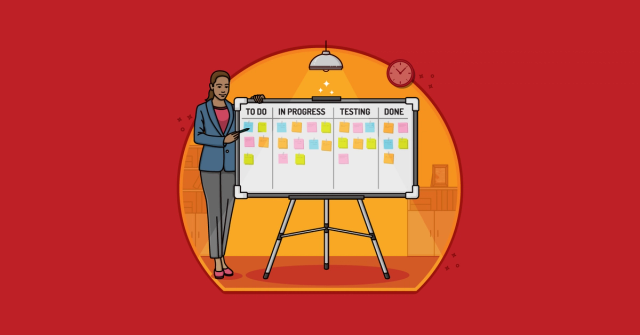
A Scrum board is a visual way to show the work Developers are doing during a sprint.
It is often organized as columns that represent the state of work. A simple board might use:
- To Do
- In Progress
- Review
- Done
Many teams add columns such as Blocked, Ready for Test, In Test, or Ready for Product Owner Review. The right columns depend on the work and what the Scrum Team needs to see.
A Scrum board is a supporting tool. The official artifact is the Sprint Backlog; the board helps make that plan visible and easier to inspect.
Scrum Boards and the Sprint Backlog
The Sprint Backlog includes the Sprint Goal, the product backlog items selected for the sprint, and the Developers’ plan for delivering the increment.
A Scrum board usually shows part of that plan.
For example, the board might show selected product backlog items as larger cards and the work needed to complete them as smaller child items, tasks, or checklist items. It may show who is working on what, what is blocked, what is waiting for review, and what has met the Definition of Done.
The board should help Developers answer practical questions:
- What work is closest to done?
- What is blocked?
- Where are we starting too much?
- What needs review, testing, or feedback?
- Are we still moving toward the Sprint Goal?
- What should we adapt today?
If the board does not help Developers inspect and adapt the Sprint Backlog, it is probably not doing much for Scrum.
Scrum Boards Are Usually Software Now
Older Scrum board examples often show index cards, sticky notes, tape lines, cork boards, or cards moved around a team room wall.
Those can still be useful. A physical board is simple, visible, and hard to ignore when everyone works in the same room.
But most Scrum Teams today are distributed, hybrid, or working in toolchains that already connect backlog items, branches, builds, pull requests, tests, and releases. For those teams, a software Scrum board is usually more practical.
A modern Scrum board should make it easy to:
- See the current state of sprint work
- Update work throughout the day
- Link work to product backlog items
- Show blocked items clearly
- Connect discussion, code, tests, or documentation when helpful
- Support distributed collaboration
- Preserve enough history for Sprint Retrospectives and forecasting
The risk is that software boards can become complicated quickly. A digital board with too many fields, statuses, automations, dashboards, and required updates can hide reality instead of revealing it.
Use the tool lightly enough that the board still helps the Scrum Team think.
What a Scrum Board Should Show
A useful Scrum board should show the work of the sprint clearly enough for Developers to coordinate.
At a minimum, it should usually show:
- The product backlog items selected for the sprint
- The current state of each item
- Work in progress
- Blocked work
- Work waiting for review, testing, or verification
- Work that meets the Definition of Done
- Progress toward the Sprint Goal
Some teams show tasks under each product backlog item. Others show backlog items as the primary cards and use checklists or linked work items for detail. Either can work.
The test is whether Developers can understand the sprint plan quickly and adapt it as they learn.
Typical Scrum Board Columns
Many Scrum boards use only a few columns, such as To Do, In Progress, and Done.
Others add columns such as Blocked, Ready for Test, In Test, Review, or Ready for Product Owner Review when doing so helps Developers see important states of work more clearly. These are common options, not a recommended checklist. Use only the columns that help your Scrum Team understand and manage sprint work.
Design the Board Around the Work
A Scrum board should reflect how work actually moves toward done.
If the Scrum Team’s work includes design, development, testing, review, documentation, and deployment preparation, the board should help the Developers see those states clearly enough to coordinate.
But the board should not recreate a waterfall process inside the sprint.
For example, a board with columns such as Analysis, Design, Development, Test, UAT, Documentation, Approval, and Done may be accurate for some teams. But it may also reveal that work is moving through handoffs rather than being finished collaboratively.
Make those handoffs visible so the Scrum Team can reduce delay, waiting, and rework.
A good board makes the current system visible. A better Scrum Team uses that visibility to reduce delay, waiting, and rework.
Scrum Boards and the Daily Scrum
A Scrum board can be a useful aid during the Daily Scrum.
Instead of having each person report what they did yesterday and what they will do today, Developers can look at the board and ask:
- What needs to move today?
- What is closest to done?
- What is blocked?
- What work is at risk?
- Are we still focused on the Sprint Goal?
- Who needs help?
- What should we stop starting so we can finish?
This shifts the Daily Scrum from individual reporting to team coordination.
The board should not turn the Daily Scrum into a status meeting for the Scrum Master, Product Owner, or manager. It should help Developers inspect progress and adapt their plan for the next day of work.
Keep the Board Updated During the Sprint
A Scrum board should not be updated only before the Daily Scrum.
Developers should update the board as they learn, finish work, discover new work, or encounter problems. If a test reveals a new task, add it. If an item is blocked, make that visible. If work is done, move it to Done only when it meets the Definition of Done.
The board is most useful when it reflects reality.
That does not mean every tiny action needs its own ticket. A board with too much detail becomes noise. The goal is enough detail for Developers to coordinate and inspect progress.
Scrum Boards and Work in Progress
A Scrum board can help a Scrum Team see whether it has too much work in progress.
Too much work in progress is one of the most common reasons teams end a sprint with many things started and few things done.
A board makes this visible. If the In Progress column is full, Developers can ask whether they should stop starting new work and help finish what is already underway.
Some teams use explicit work-in-progress limits. Others use the board more informally. Scrum does not require WIP limits, but many teams find them helpful.
The important habit is noticing when work is spread too thin.
Scrum Board vs. Kanban Board
Scrum boards and Kanban boards can look similar. Both visualize work as it moves through different states.
The difference is how they are usually used.
A Scrum board typically shows the work selected for a sprint. It is reset or substantially refreshed each sprint because the Sprint Backlog changes. The board helps Developers manage the sprint plan and progress toward the Sprint Goal.
A Kanban board usually represents a continuous flow of work. It may not reset on a sprint boundary. It often emphasizes work-in-progress limits, flow metrics, and continuous delivery of items through the system.
A Scrum Team may borrow useful ideas from Kanban, such as WIP limits or flow metrics. That can be helpful. Just be clear about what the board is supporting: the Developers’ plan for the sprint.
Common Problems with Scrum Boards
The Board Becomes a Reporting Tool
A Scrum board should help Developers manage their work.
When the board is designed mainly for managers, dashboards, or status reporting, Developers may stop seeing it as their tool. They update it because someone wants data, not because it helps them coordinate.
The Board Is Not Updated
A stale board is worse than no board because it creates false transparency.
If the board says work is on track but Developers know it is blocked, the board is not helping. Update the board as the work changes, not just when someone asks.
The Board Has Too Many Columns
Too many columns can make the board harder to understand.
Use columns that reveal meaningful changes in the state of work. Avoid creating a column for every tiny step if those steps do not help Developers coordinate.
The Board Hides Blocked Work
Blocked work should be obvious.
If blocked items look like everything else, the Scrum Team may not act quickly enough. Use a Blocked column, a visible marker, or another clear signal.
Everything Piles Up in Testing
If many items wait for testing or verification near the end of the sprint, the board is showing a real problem.
The Scrum Team may need earlier testing, smaller product backlog items, more collaboration between programmers and testers, or a stronger Definition of Done. For more detail, see Your Team Won’t Think of Everything in Sprint Planning Meetings. and That’s OK..
Done Does Not Really Mean Done
The Done column should reflect the Definition of Done.
If work in Done still needs review, integration, testing, documentation, or acceptance, the board is making progress look better than it is.
The Board Ignores the Sprint Goal
A Scrum board can show a lot of activity while hiding the most important question: are we still moving toward the Sprint Goal?
Developers should use the board to manage work, but they should not let the board replace the Sprint Goal.
Before You Trust the Board
Use these questions to decide whether your Scrum board is helping:
- Does the board reflect the current Sprint Backlog?
- Can Developers see what is in progress, blocked, waiting, and done?
- Is the board updated as work changes during the sprint?
- Does Done mean the work meets the Definition of Done?
- Does the board help Developers focus on the Sprint Goal?
- Is blocked work easy to see?
- Is work in progress visible enough to manage?
- Does the board help the Daily Scrum become a planning conversation?
- Is the board simple enough that Developers actually use it?
- Does the board reveal problems the Scrum Team can improve?
Use the answers to decide whether the board is creating useful transparency.
FAQ
What is a Scrum board?
A Scrum board is a visual tool Developers use to see and manage sprint work.
It usually shows the work selected for the sprint and where that work stands: not started, in progress, blocked, waiting for review or testing, or done.
Is a Scrum board an official Scrum artifact?
No.
The official Scrum artifacts are the Product Backlog, Sprint Backlog, and Increment. A Scrum board is a supporting tool that can help make the Sprint Backlog visible.
What is the difference between a Scrum board and the sprint backlog?
The Sprint Backlog is the Developers’ plan for the sprint.
A Scrum board is one way to visualize that plan. The board may show selected product backlog items, tasks, blocked work, review steps, and done work.
What columns should a Scrum board have?
A simple Scrum board might use To Do, In Progress, Review, and Done.
Some teams add Blocked, Ready for Test, In Test, or Ready for Product Owner Review. Use the columns that help Developers see and adapt their work.
Should a Scrum board be physical or digital?
Most Scrum boards today are digital because many Scrum Teams are distributed or use software tools to manage work.
Physical boards can still work for co-located teams. The choice matters less than whether the board helps Developers see reality and coordinate.
Should the product owner use the Scrum board?
The Product Owner may look at the Scrum board to understand progress, risks, and questions during the sprint.
But the board should remain primarily a tool for Developers to manage the Sprint Backlog. It should not become a way for the Product Owner to assign or micromanage work.
Should managers use the Scrum board?
Managers may look at the board to understand how the Scrum Team is doing, but they should be careful.
If the board becomes a management reporting tool, Developers may stop using it for honest coordination. The board should reveal reality, not encourage performance theater.
How often should developers update the Scrum board?
Developers should update the board whenever the state of the work changes enough to matter.
That may happen during the Daily Scrum, but it should also happen throughout the day as work starts, finishes, gets blocked, or changes.
Should Scrum boards use work-in-progress limits?
Scrum does not require WIP limits, but many Scrum Teams find them useful.
A WIP limit can help Developers stop starting too much work and focus on finishing what is already in progress.
What if the Scrum board does not match reality?
Fix it quickly.
A board that does not match reality creates false transparency. Update the board, then inspect why it became stale. The problem may be too much detail, poor tool design, unclear ownership, or a board that Developers do not find useful.

Why Your Scrum Team Still Works Like Individuals
FeaturedLearn how handoffs, individual task ownership, and status-report daily scrums keep Scrum teams from collaborating—and what to change next sprint.

Should the Daily Scrum Be Person-by-Person or Story-by-Story?
FeaturedChoose whether to discuss work person-by-person or story-by-story in daily scrum.

Leading Agile Initiatives: How Leaders Help Agile Change Succeed
FeaturedAn agile initiative is not mainly a one-time rollout of Scrum, Kanban, SAFe, Jira, new job titles, or a different meeting calendar.

Four Common Scrum Master Mistakes–and How to Fix Them
Avoid these 4 pitfalls—like dodging tough talks—to become a more effective Scrum Master.
When Kanban is the Better Choice
Debating between Scrum and Kanban? Guest author Brendan Wovchko offers five advantages Kanban has over Scrum.

Building a Product Users Want: From Idea to Backlog with the Vision Board
Connect product vision to backlog decisions so teams build toward a product customers actually want.

Ten Tips for More Effective Daily Scrums
Use practical tips to make daily scrums shorter and more useful.